
From the card to the pot.
Your family recipes, on your Thermomix®.
Photograph a handwritten card, paste a link or just say what you'd like to cook. Handspoon chooses the time, temperature and speed and sends the recipe to your machine, so you cook it guided on its display.


The store links follow at launch.
Your first recipe is free. After that, the yearly plan starts with 7 days free, then €39.99 a year, through the App Store or Google Play. Cancel anytime.
How it works
From the card to your machine's display in four steps.
Salmon, rice and broccoli (Mum's)
Chop an onion, soften in a little oil.
1 cup rice, 2 cups water, lid on, simmer 20 min.
Fry the salmon in butter, 3 to 4 min each side.
Broccoli 5 min in salted water.
Sauce: cream + lemon, just warm it.
On the display of your Thermomix® TM7
Step 1 of 5
- Time
- 5 sec
- Speed
- 5
Put 1 onion, halved, in the mixing bowl and chop 5 sec / speed 5.
Simplified preview. Your machine shows the recipe in its own design. Checked against your machine's limits. Please look over the settings before you start.
Add your recipe
Photograph a handwritten card, paste a link or say it in your own words.
We set it up for your machine
Time, temperature and speed for every step, checked against your machine's limits.
It appears on your Thermomix
In the app you sign in to your own Cookidoo® account yourself. Handspoon saves the recipe in your created recipes, and it syncs to your machine.
Cook it guided on the machine
Open the recipe on the machine's display and cook it step by step, with every setting already chosen.
Prefer your phone? Cook mode in the app reads each step aloud next to the machine. It works on every supported machine, including the TM5.
Prefer your phone? Cook mode in the app
Cook with your voice
One step per screen, read aloud. Say "next" when you're ready. Your hands can stay in the dough.
Just saynextbackrepeatingredients
We only listen while cook mode is open, and your phone understands what you say by itself.
Try it: tap "Next step" in the preview.
Step 1 of 5
Listening. Say next, back or repeat.
Preview of the Handspoon app. It shows each step on your phone, next to your machine.
Your family cookbook
Every recipe in one place, set up for your machine: the weeknight favourites, the Sunday classics and the ones from the family.
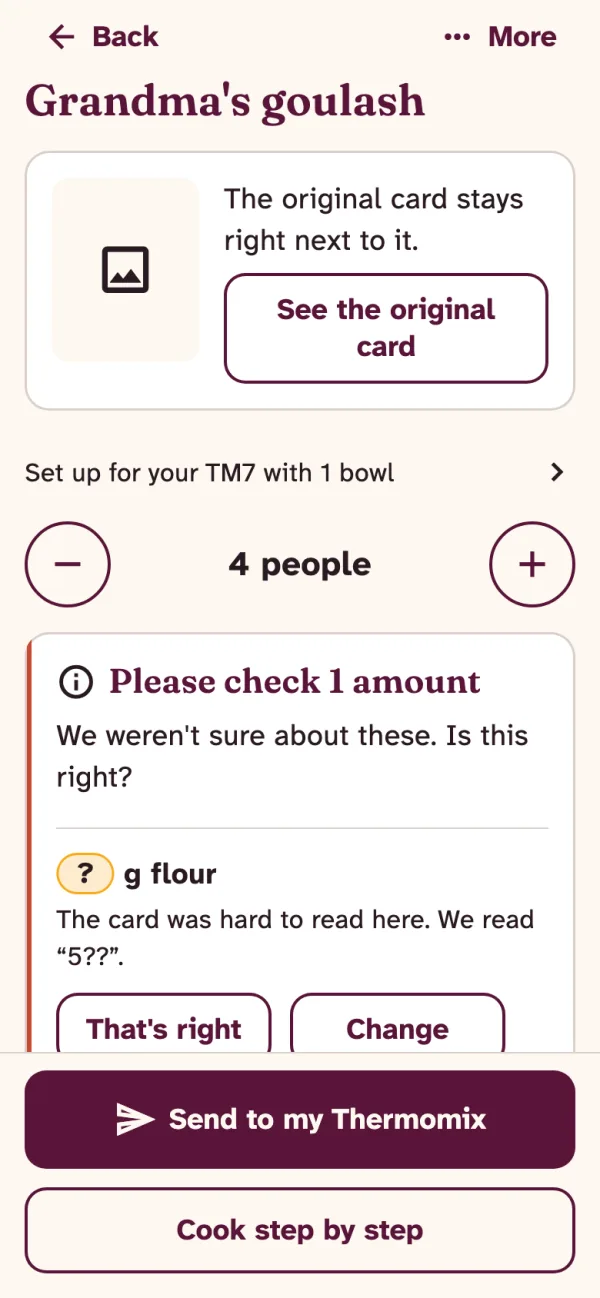
- Change the number of people, and the amounts follow.
- Keep a photo of the original card next to the recipe, if you like.
- Share a recipe with the family with one link.
Made for the machine in your kitchen
Handspoon sends your recipe to the TM7 and TM6. On every supported machine you can also cook along in the app.
Thermomix® TM7
Ready now- Recipe goes to the machine
- Cook mode in the app
Thermomix® TM6
Ready now- Recipe goes to the machine
- Cook mode in the app
Thermomix® TM5
Ready now- No sending to the machine
- Cook mode in the app
On the TM5 you cook with the app's cook mode. Cookidoo® cannot send created recipes to a TM5.
Monsieur Cuisine
Coming soonBosch Cookit
Coming soon
Plain prices. Cancel any time.
Handspoon Plus sets up your recipes and cooks along with you.
Yearly Save 44 %
€39.99 a year
That is €3.33 a month
Monthly
€5.99 a month
- Cards, links and ideas, set up for your machine.
- Cook along by voice, one step at a time.
- Your family cookbook, with the original card if you like.
- Up to 40 new recipes a month.
Your first recipe is free. After that, the yearly plan starts with 7 days free, then €39.99 a year, through the App Store or Google Play. Cancel anytime.
Without Plus, your saved recipes stay yours: you can still open them and cook along.

Questions
Can I turn grandma's handwritten recipe into a Thermomix® recipe?
Yes. Photograph the card, and Handspoon reads the handwriting and sets up every step with time, temperature and speed, checked against your machine's limits. If a line is hard to read, the app asks you to type it in or take the photo again. If you like, the photo of the card stays next to the recipe.
Can I add a recipe from TikTok, YouTube or Instagram?
Yes. In TikTok, YouTube or your browser, tap Share and choose Handspoon: it takes the recipe from the video's description or the page. Instagram does not let apps read its posts, so share a screenshot of the recipe instead, and Handspoon reads it from the picture. If a video's description has no recipe in it, you can say it or type it.
Can I send my own recipes to the Thermomix® TM7?
Yes. Add your recipe as a photo of the card, a link or in your own words, and Handspoon sets up every step with time, temperature and speed for the TM7. You sign in to your own Cookidoo® account in the app yourself, Handspoon saves the recipe under Created Recipes, and it syncs to your TM7. The same works for the TM6.
How does the recipe get onto my Thermomix?
In the app you sign in to your own Cookidoo® account yourself. Handspoon then saves the recipe under Created Recipes in that account, it syncs to your TM7 or TM6, and you open it on the machine's display and cook it step by step. On the TM5 you cook with the app's cook mode instead.
Does it work with the Thermomix® TM5?
Yes, with cook mode in the app. Cookidoo® cannot send created recipes to a TM5, so Handspoon sets up your recipe with time, temperature and speed for the TM5 and reads each step aloud next to the machine.
Do I need Cookidoo®?
To send recipes to a TM7 or TM6, yes: you need your own Cookidoo® account, which you sign in to in the app yourself. Handspoon saves your recipes under Created Recipes there. For cook mode in the app you need no Cookidoo® account.
Do I need Plus to get a recipe into Cookidoo®?
Sending a recipe straight to your Cookidoo® account is part of Handspoon Plus. Not on Plus? The helper in the app takes you through entering it in Cookidoo yourself, one part at a time, with every setting. The helper comes with every Handspoon account. Either way you need a Cookidoo account that can save created recipes.
Which machines does it work with?
Thermomix® TM7 and TM6: Handspoon sends the recipe to your machine, and you can also cook along in the app. Thermomix® TM5: you cook with the app's cook mode, because Cookidoo® cannot send created recipes to a TM5. Monsieur Cuisine and Bosch Cookit are coming soon.
What does Handspoon cost?
Handspoon Plus costs €5.99 a month or €39.99 a year, with up to 40 new recipes a month. Your first recipe is free. For new subscribers the yearly plan starts with 7 days free through the App Store or Google Play; the monthly plan has no free days. Cancel anytime.
How does the free trial work?
Your first recipe is free, with no subscription. After that you choose a plan in the app. For new subscribers the yearly plan starts with 7 days free, and in the free days you can add up to 10 new recipes. The monthly plan has no free days and is paid at once. The App Store or Google Play runs the trial and shows you the free days and the price before you confirm. Cancel in your App Store or Google Play settings at least 24 hours before the free days end, and you pay nothing.
Can I cancel any time?
Yes. You cancel in your App Store or Google Play settings, at least 24 hours before the next payment. Your saved recipes stay yours.
What happens to my recipes and card photos?
Your recipes stay in your family cookbook and are only seen by others when you share them. The app asks once whether to keep the photo of a card; if you say no, it is not kept.
Does the app listen all the time?
No. In cook mode we only listen while cook mode is open, and your phone understands what you say by itself, so nothing you say there leaves your phone. On phones that can't do this, saying "next" is switched off and the buttons do the rest. When you add a recipe by speaking, your phone turns what you say into text by itself too, and only that text, which you check first, is sent to set up the recipe. Your voice never leaves your phone.

Get the app
Start with a recipe you know by heart.
The store links follow at launch.
Your first recipe is free. After that, the yearly plan starts with 7 days free, then €39.99 a year, through the App Store or Google Play. Cancel anytime.